
Electronic Invoice Issuance
Processing customer invoices
Current Reality
The use of paper invoices itself introduces significant additional costs inherent in document handling from both the customer's and the supplier's perspective, limiting the ability to optimize and reduce process cycles. All this, combined with the upcoming mandatory use of electronic invoicing, means that improving the customer invoicing process is not an option.
Our proposal | Customer Portal
easyap provides its customers with the easyei electronic invoicing customer portal as a model to assist in the process of issuing, sending, accounting for, and storing customer invoices, including interconnection with public administrations via FACe, regional tax authorities via TicketBAI, and specific portals. In addition, the easyei customer portal allows customers to consult/download information, not only invoices but also all relevant information relating to the commercial relationship. Tracking invoice statuses is also part of the portal's functionality.
The use of electronic invoicing mechanisms, whether e-invoices, EDI, UBL, or any customized format signed electronically, in addition to being fully valid for tax purposes, will streamline the process both from the perspective of the receipt cycle and subsequent stages of the invoicing process. For customers whose volume justifies it, the implementation of customized formats signed electronically is an option to consider, guiding the automatic accounting of these invoices.
The use of a customer portal to facilitate the consultation/download and issuance of duplicate invoices reduces the number of incidents and fosters a closer customer/supplier relationship, in addition to complying with the requirements of the new electronic invoicing regulations.
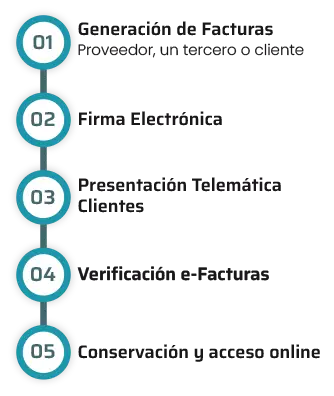
These, at a high level, are the different elements in the process.
Benefits
- Comply with the new legal requirements of the Electronic Invoicing regulations.
- Economic savings due to the elimination of the printing and stamping costs
- Guaranteed delivery of invoice to client with traceability
- Reduction of cycle from issuing to client delivery
- Productivity increase by the parties involved in the process with the consequent cost savings
- Improve the client/provider relationship
- Automatic recording of invoices issued
- Electronic register of actions carried out
- Direct interconnection with FACe, TicketBAI, and Peppol.
Electronic invoicing with easyei (easyap's electronic invoicing platform)
The invoicing process remains unchanged; the only change is in the way invoices are sent to customers, with each customer receiving invoices in a legally valid electronic format that is accepted by their billing systems.
Let's not forget that there is no single valid electronic invoice format; each customer can choose a different one, such as e-invoice, EDI, UBL, etc., and a specific delivery channel, from the simplest ones such as email or FTP to web invoicing or value-added networks such as Face B2B, Peppol, etc.
easyei users can upload invoices issued to their customers using one of the following methods:
- WEB invoicing: manual entry of invoices directly on the easyei portal
- Automatic loading or importing of structured files in standard formats such as XML, CSV, or Excel.
- Use of the easyei invoice scanning function and validation of data automatically extracted by OCR.
- Uploading PDF files and validating data automatically extracted by OCR.
- Custom formats subject to prior assessment by easyap.
All electronic formats allow for the simultaneous sending of electronic invoices and electronically signed PDF invoices.
Customers can receive their invoices in the valid electronic format accepted by them through the following channels:
- Direct download from the easyei customer portal
- email (delivery assurance and bounce management)
- ftp
- upload to their specific portals (via email or FTP)
- with customized interfaces subject to prior assessment by easyap.
The easyei customer portal will facilitate compliance with the new electronic invoicing regulations by making invoices available to customers in legally valid formats and providing information on their status in accordance with the regulations.
Customer Portal
As part of the easyap electronic invoicing solution, a customer web portal is included, designed to enable customers to resolve all queries that they would normally direct to the accounts receivable department or any other department within the company. The solution is based on digital transformation, automation, and proceduralization, highlighting the following points:
- Complete circuit: possibility of informing the customer about each of the phases and statuses of the invoices.
- Download invoices and duplicates.
- Possibility of managing attached invoice documentation.
- Management of all types of commercial documents, price lists, delivery notes, etc.
- Multi-channel, customer information system complemented by incident management system.
- Possibility of automating contact data maintenance in customer master.
- Bidirectional.
- 24/7.
- Training procedures and answering of “FAQ”.
How does easyei work when issuing invoices?
Process
easyei is a web application designed to allow the quick and easy issuing of electronic invoices complying with the legal requirements to guarantee the invoice's validity. Presented below are the steps for the issuing of electronic invoices.

1. Issuing of Invoices:
The invoices are issued in the client's accounting program/ERP without any change (printing of invoices not necessary).Issuing of invoices:
The invoices are exported for their transfer to the easyei portal(customizable and adaptable format for each client)


2. Sending of Invoices to easyei:
The generated invoices, with their attachments, are sent/uploaded to the easyei electronic invoicing customer portal. Automatic collection from the accounting system by the easyei portal is also an option.
If desired, you can prepare the invoices directly in the portal via internet.

3. Invoice Receipt:

4. Electronic invoice format by customer:
Set the electronic invoice format you want to send to each of your customers (facturae, e-invoice, brl, edi, SAP, etc.).
Paper invoices are also accepted.

5. Signing of Invoice:
The invoices are signed by the issuer or by the certificate of the portal.

6. Sending of Invoices:
Invoices are sent to each of your customers in the agreed format.
It is also possible to send accounting files in the format of the main ERPs (SAP, JDE, Oracle, Navision, etc.).

7. Acknowledgement of Receipt:
If so desired an acknowledgement of receipt will be sent the moment your client receives the invoice.

8. Invoice Status:
You can automatically find out whether the customer accepts or rejects the invoice sent, or whether it has been received correctly. The same applies to payment information.

9. Invoice Safe-keeping:
The invoices are stored in easyaei portal and will be available for future consultation by you or your clients for the agreed period of time.
Customers can view their invoices and/or related information and statements directly.
“
Mutual benefit: satisfied customer and freed-up resources.
”

